Phet Build an Atom Simulation Solution Guide
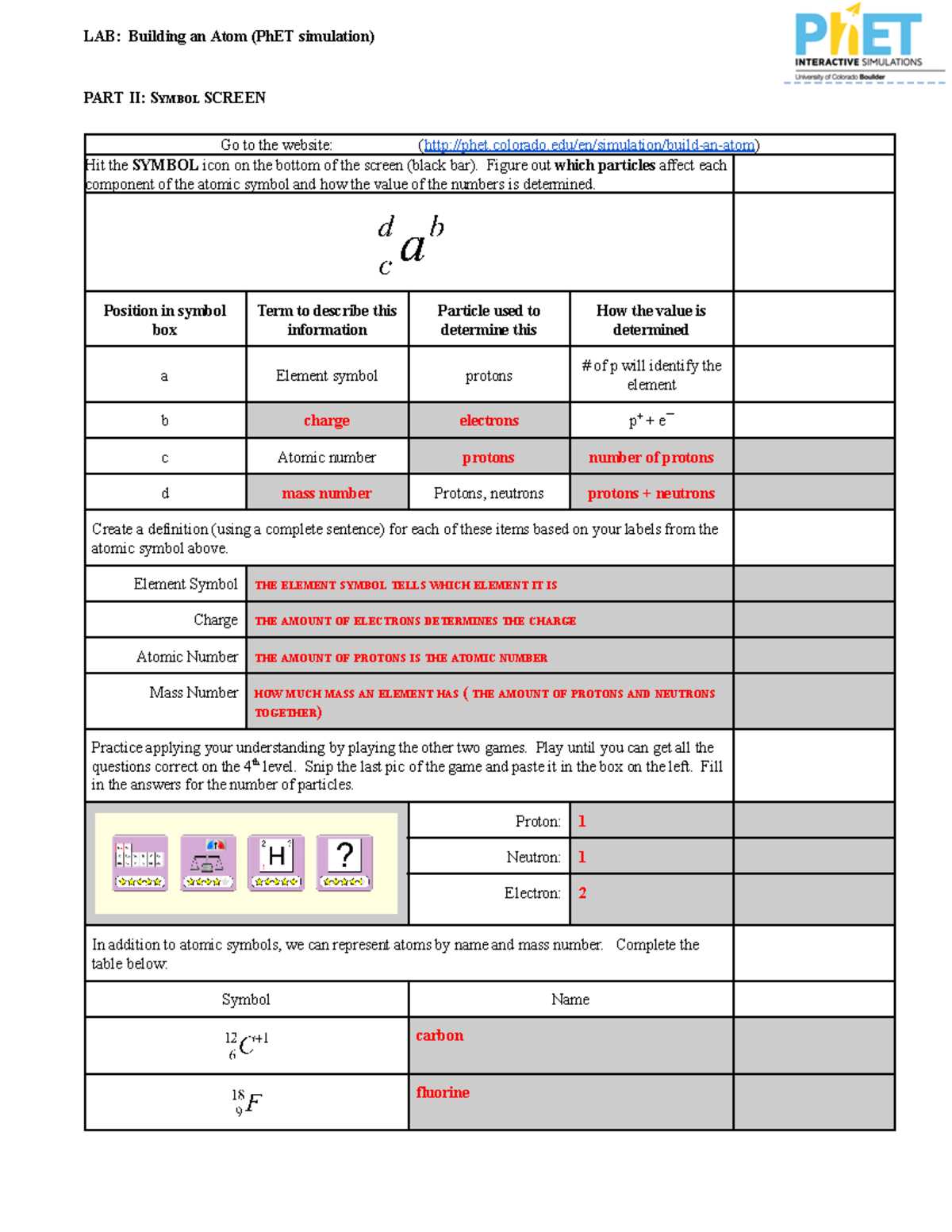
To successfully navigate the process of constructing atomic models, it’s crucial to understand the proper sequence for adding subatomic particles. Begin by selecting the right number of protons, neutrons, and electrons to form the desired element. This selection determines the atomic number and the general structure of the atom, influencing its chemical behavior.
Accurately positioning electrons in distinct shells is another important step. Electrons fill energy levels starting from the innermost shell, and the maximum number of electrons per shell follows a specific pattern, crucial for understanding electron configuration and reactivity. Pay attention to these details to ensure proper atomic structure representation.
Additionally, working with isotopes involves adjusting the number of neutrons. This can alter the mass of the atom but not its chemical identity. Understanding this concept is key when experimenting with different atomic models in the simulation.
Understanding Atomic Structure in Simulations
Begin by determining the atomic number of the element you wish to model. This will give you the number of protons. For a neutral atom, the number of electrons will equal the number of protons. Place these electrons in their appropriate shells, starting with the lowest energy level. Each shell can hold a specific number of electrons: the first shell holds up to 2, the second up to 8, and so on. Be mindful of the electron configuration and remember that the outermost shell is crucial for determining the atom’s reactivity.
Next, adjust the number of neutrons. The number of neutrons does not affect the chemical properties of the element but changes its atomic mass. By altering the neutrons, you can create isotopes of the element. Ensure that the total number of particles in the nucleus (protons + neutrons) corresponds to the atomic mass number you are targeting.
Lastly, understand the representation of isotopes and ions in the simulation. Adding or removing electrons results in ions, while changes to neutrons produce isotopes. It’s important to maintain consistency with the charge and mass number when completing these adjustments. Keep these details in mind to accurately model different atomic species.
Understanding the Simulation Interface
The user interface of the simulation is divided into several key sections that allow for easy manipulation of atomic structures. At the top, you’ll find control buttons that allow you to choose the element or customize the atomic properties. The left panel provides options for adjusting the number of protons, neutrons, and electrons. You can drag these sliders to see how changes affect the atom’s characteristics.
Below the main panel, the visual representation of the atom will update in real-time. You’ll see the nucleus, made up of protons and neutrons, along with the electron shells surrounding it. Each shell has a maximum capacity, indicated by a number, and electrons will be placed in the appropriate shell based on the atom’s energy levels.
To the right, there is a section displaying the atomic number, atomic mass, and charge. This information automatically updates as you adjust the atom’s components. The simulation provides immediate feedback, showing whether the atom is neutral, an ion, or an isotope based on your adjustments.
The interface also allows for resetting the atom back to its default configuration, making it easier to experiment with different setups. You can also explore different isotopes by changing the number of neutrons or test ionization by removing or adding electrons.
- Proton slider: Adjusts the number of protons, determining the element.
- Neutron slider: Changes the number of neutrons, affecting the isotope.
- Electron slider: Adds or removes electrons, creating ions or neutral atoms.
- Visual Display: Updates with each change to show how the atom looks.
- Information panel: Shows real-time data such as atomic number, mass, and charge.
Steps to Construct a Basic Structure in the Simulation

1. Select the element: Start by choosing the element you want to create. Use the control panel to adjust the number of protons, which determines the element’s identity. For example, selecting hydrogen will set the number of protons to one.
2. Add neutrons: Adjust the neutron slider to customize the atomic mass. Increasing or decreasing neutrons will change the isotope of the element. For instance, adding a neutron to hydrogen will create deuterium, an isotope of hydrogen.
3. Place electrons: Move the electron slider to add or remove electrons. Electrons fill the shells around the nucleus starting from the innermost shell. Be sure to place the electrons in the correct energy levels to maintain balance in the atom.
4. Check the charge: After adjusting protons and electrons, check the charge of the structure. If the number of electrons equals the number of protons, the structure will be neutral. If not, the atom will become an ion.
5. Visualize the result: The interface will display the structure in a visual model showing the nucleus with protons and neutrons, and the surrounding electron shells. This helps you verify if the atom has been constructed correctly based on the input values.
6. Reset if needed: If you want to try again, use the reset button to clear all adjustments and start over with a new setup.
| Component | Function | Effect |
|---|---|---|
| Protons | Define the element | Changes the element’s identity (e.g., hydrogen, helium) |
| Neutrons | Determine the isotope | Altering neutrons creates isotopes (e.g., hydrogen vs deuterium) |
| Electrons | Define the charge | Adding/removing electrons makes the atom an ion or neutral |
Identifying Atomic Components: Protons, Neutrons, and Electrons
Protons: These subatomic particles carry a positive charge. The number of protons in the nucleus defines the element. For example, hydrogen has one proton, while helium has two. The proton count determines the atomic number of an element.
Neutrons: Neutrons are neutral particles, meaning they have no charge. They contribute to the atomic mass but do not affect the chemical properties of an element. Changing the number of neutrons results in different isotopes of the same element. For example, carbon-12 and carbon-14 are isotopes of carbon, differing by the number of neutrons.
Electrons: Electrons are negatively charged particles found in electron shells around the nucleus. The number of electrons typically matches the number of protons in a neutral atom, balancing the charges. Electrons are involved in chemical bonding and reactions. Their arrangement in shells around the nucleus follows specific energy levels.
In a neutral atom, the number of protons equals the number of electrons, resulting in no overall charge. The combination of protons and neutrons determines the element’s identity and mass, while electrons play a key role in interactions and chemical bonding.
How to Adjust Atomic Numbers and Isotopes
To modify the atomic number, simply increase or decrease the number of protons in the nucleus. The atomic number defines the element, so adjusting it will change the element entirely. For example, increasing the proton count from 6 to 7 turns carbon into nitrogen.
To create isotopes, change the number of neutrons while keeping the proton count fixed. This will not affect the element but will alter its atomic mass. For instance, carbon-12 has 6 neutrons, while carbon-14 has 8 neutrons. Both are isotopes of carbon, but they differ in mass.
Adjusting atomic numbers and isotopes allows for the exploration of different elements and their variations. You can experiment with various combinations to observe how changes in proton and neutron counts affect atomic properties.
For further information, refer to resources on atomic structure from reliable educational sites like American Chemical Society.
Understanding Electron Shells and Energy Levels
Electron shells, or energy levels, represent the regions around the nucleus where electrons are likely to be found. Each shell can hold a specific number of electrons, determined by the formula 2n², where n is the shell number. For example, the first shell (n=1) can hold up to 2 electrons, the second shell (n=2) can hold up to 8, and the third shell (n=3) can hold up to 18.
To visualize the electron distribution, start with the innermost shell and add electrons until it reaches its maximum capacity. After filling the first shell, move on to the next shell and continue until all electrons are placed. This distribution determines the chemical properties of the element and how it interacts with other elements.
Energy levels are linked to the energy of electrons within them. Electrons in outer shells have higher energy levels than those closer to the nucleus. When electrons absorb energy, they can move to higher shells, a process known as excitation. Conversely, when they release energy, they drop to lower shells, emitting light in the process.
Understanding the arrangement of electron shells helps explain atomic stability and reactivity. Elements with full outer shells tend to be more stable, while those with incomplete shells are more reactive and likely to form bonds with other atoms.
Interpreting Atomic Models in Simulation
When analyzing atomic structures in the simulation, focus on the number of protons, neutrons, and electrons. The nucleus, consisting of protons and neutrons, is surrounded by electron shells. Each shell holds a specific number of electrons, depending on the energy level. The first shell can hold up to 2 electrons, the second up to 8, and the third up to 18.
In the simulation, electrons orbit the nucleus in these shells. The number of protons in the nucleus determines the element, while the electrons in the outermost shell affect the element’s chemical properties. Pay attention to how changes in the number of protons, neutrons, or electrons alter the atomic structure and energy levels.
When adjusting the proton count, you observe the atomic number changing, which identifies the element. Neutrons influence the isotope of an element, and modifying electron numbers will alter the charge and may result in the formation of ions.
Interpreting these models helps understand the behavior of elements under different conditions. The simulation allows for dynamic changes to the atomic structure, making it easier to grasp the relationship between atomic components and their interactions in chemical reactions.
Common Errors and How to Fix Them While Building Atoms
Here are some frequent mistakes encountered while creating atomic models and how to correct them:
- Incorrect Electron Shell Arrangement: Ensure that electrons are placed in the correct number per shell. The first shell holds 2 electrons, the second holds 8, and the third holds 18. If more electrons are added to a shell than it can hold, move them to the next shell.
- Wrong Atomic Number: Double-check the proton count, as it directly determines the element. The number of protons equals the atomic number. If the atomic number doesn’t match the protons, reset the number of protons to match the element you’re aiming for.
- Misplaced Neutrons: Neutrons should be placed in the nucleus with protons. The number of neutrons may vary depending on the isotope of the element. Ensure that the total mass number (protons + neutrons) matches the element’s isotope.
- Electron-Proton Imbalance: A neutral atom should have an equal number of electrons and protons. If the atom has more or fewer electrons than protons, it will become charged. Adjust the electron count to balance with protons for neutrality or leave it unbalanced for ions.
- Overcrowding Electron Shells: If too many electrons are in the inner shells, ensure the outer shells have electrons placed in them first, according to the shell capacity (2-8-18). This will prevent overloading inner shells and give a correct atomic structure.
By carefully reviewing the proton, neutron, and electron counts, and adhering to correct shell configurations, you can avoid common errors and ensure the accuracy of your atomic models.
Practical Applications of the Atom Building Tool in Education
Using interactive simulations for constructing atomic models in educational settings offers multiple advantages. Here are several practical uses of this tool:
- Visualizing Atomic Structure: Students can explore the structure of various elements by adjusting proton, neutron, and electron numbers. This hands-on experience solidifies their understanding of atomic theory and the periodic table.
- Understanding Isotopes: By modifying neutron counts, learners can experiment with isotopes of the same element, understanding how different neutron numbers affect atomic mass without altering chemical properties.
- Interactive Learning: This tool allows learners to actively participate in the construction of atomic models, enhancing engagement compared to traditional methods. They can test their hypotheses and observe real-time results.
- Supporting Inquiry-Based Learning: Students can ask questions and test their theories on atomic interactions. The simulation encourages inquiry-based learning by providing immediate feedback, which is crucial for critical thinking and problem-solving.
- Teaching the Concept of Ionization: By adjusting electron numbers, students can learn how ions are formed. They can compare neutral atoms with ions and explore the role of electrons in chemical reactions.
Integrating such simulations into the classroom provides a dynamic learning environment where students can experiment, visualize abstract concepts, and gain deeper insights into atomic theory.