Box and Whisker Plot Worksheet Solutions and Explanations
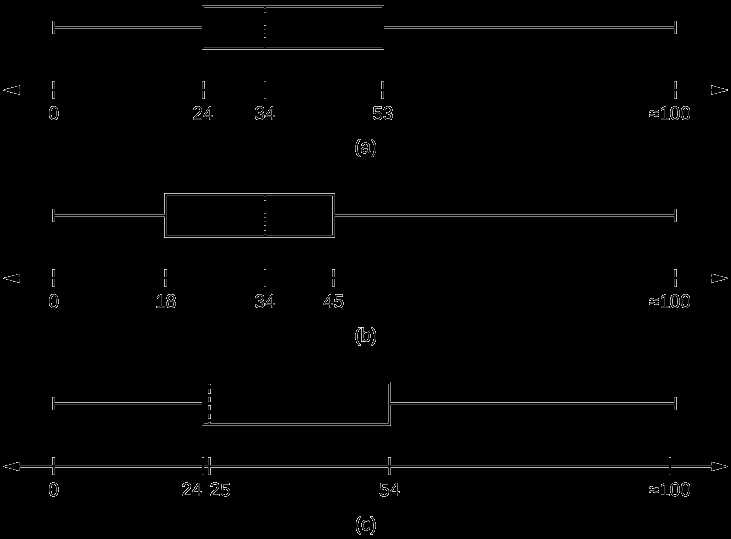
To solve problems involving data distribution using the plot method, start by identifying the five key points: the minimum, first quartile, median, third quartile, and maximum. These are crucial for constructing the plot and analyzing data spread. By understanding how to calculate these values, you can build an accurate graph and interpret key trends in the data.
Begin by arranging the data set in ascending order. The next step is to determine the median (the middle value), followed by finding the quartiles. The first quartile marks the median of the lower half of the data, while the third quartile marks the median of the upper half. The range between the first and third quartile represents the interquartile range, which provides insight into the spread of the data.
For correct visualization, plot these five data points on a number line and draw a box from the first quartile to the third quartile. The line inside the box represents the median. The “whiskers” extend from the box to the minimum and maximum values. Pay close attention to any potential outliers, which may fall outside the whiskers, and make sure to interpret these values correctly.
Using this method, you can analyze various data sets with confidence, check your results through graphical representation, and avoid common mistakes in constructing and interpreting the plot. Practice with multiple examples to improve both your skills and understanding of this powerful data analysis tool.
Box Plot Solution Guide
Start by organizing your data in ascending order. Identify the minimum, first quartile (Q1), median, third quartile (Q3), and maximum values. These are the five key points needed to create a plot. The next step is calculating the median, which divides the data set into two equal halves.
To find the quartiles, split the lower and upper halves of the data. Q1 is the median of the lower half, while Q3 is the median of the upper half. Once you have these values, calculate the interquartile range (IQR) by subtracting Q1 from Q3. This range helps you understand the spread of the middle 50% of the data.
Now, plot the five key points on a number line: the minimum, Q1, median, Q3, and maximum. Draw a box from Q1 to Q3, and place a line at the median. Extend the “whiskers” from the edges of the box to the minimum and maximum values, marking any potential outliers that fall outside the whiskers.
Use the plot to identify trends in the data, such as skewness or symmetry. If the whiskers are unequal in length, this can indicate a skewed distribution. Outliers, which lie beyond 1.5 times the IQR, should be carefully considered as they can affect the interpretation of the data.
Practice constructing these plots with different data sets to ensure accuracy and improve your ability to quickly interpret data distributions. This method provides a clear visual representation of data spread and can be useful for comparing multiple sets of data.
How to Calculate the Median for a Box Plot
To find the median for a plot, first arrange the data set in ascending order. The median is the middle value, or the central point, of the data set. If the number of data points is odd, the median is the number located at the center of the list.
If the number of data points is even, calculate the median by averaging the two central values. For example, if your ordered data set has 10 numbers, take the 5th and 6th values, then compute their average.
Once the median is identified, it will be represented as a vertical line within the plot, splitting the data into two equal halves. The median is crucial for understanding the center of the data and is used to define the middle of the box in the plot.
After determining the median, proceed with identifying the other key points, such as the first and third quartiles. These quartiles, along with the median, help in constructing the visual representation of the data distribution.
Identifying Quartiles and Interquartile Range in Data
To find the quartiles in a data set, first arrange the values in ascending order. The first quartile (Q1) is the median of the lower half of the data, excluding the median if the number of data points is odd. Similarly, the third quartile (Q3) is the median of the upper half of the data.
Here are the steps for identifying quartiles:
- Sort the data in ascending order.
- Find the median (Q2) of the entire data set.
- Find Q1 by determining the median of the lower half of the data set.
- Find Q3 by determining the median of the upper half of the data set.
Once the quartiles are identified, the interquartile range (IQR) can be calculated by subtracting Q1 from Q3. The IQR represents the spread of the middle 50% of the data, helping to understand the variability and detect potential outliers.
For example, if Q1 = 10 and Q3 = 20, the IQR is 20 – 10 = 10. The IQR is often used to identify data points that fall outside of the typical range and could be considered outliers.
Step-by-Step Instructions for Drawing a Box and Whisker Plot
Follow these steps to draw a plot based on a given data set:
- Arrange the data in ascending order: Start by sorting the values from lowest to highest.
- Find the median (Q2): This is the middle value in the sorted data set. If there’s an even number of values, the median is the average of the two middle values.
- Find the first quartile (Q1): This is the median of the lower half of the data, excluding the median. If the data set has an odd number of elements, include the median in the lower half.
- Find the third quartile (Q3): This is the median of the upper half of the data, excluding the median of the full data set.
- Determine the minimum and maximum: These are the smallest and largest values in the data set.
- Draw the number line: Draw a horizontal line and mark the minimum and maximum values. Add ticks for Q1, median, and Q3 along the line.
- Plot the quartiles: Draw a box from Q1 to Q3. The length of the box represents the interquartile range (IQR). Draw a vertical line at the median inside the box.
- Add the whiskers: Draw lines (whiskers) extending from the box to the minimum and maximum values. These lines represent the spread of the data outside the interquartile range.
Once the plot is complete, it visually represents the distribution of data and highlights the central tendency, spread, and any potential outliers.
Understanding the Role of the Minimum and Maximum Values
The minimum and maximum values are crucial in understanding the spread and distribution of data. These values help define the range of the data set and are used to create the boundaries of the plot.
- Minimum Value: This is the smallest data point in the set. It serves as the starting point for the leftmost end of the whisker in the plot. The minimum indicates the lowest observed value and can highlight any extreme data points.
- Maximum Value: This is the largest data point in the set. It marks the rightmost end of the whisker in the plot. The maximum reflects the highest observed value and can also point out any outliers that fall outside the normal range.
By plotting both the minimum and maximum values, you can visually assess the range of the data. These values are not affected by the distribution within the quartiles but are instead determined solely by the lowest and highest observations in the data set.
Including these values in the plot helps to see the overall spread and detect any extreme outliers, making it easier to interpret the overall variability of the data.
How to Interpret Outliers in a Box and Whisker Plot
Outliers are data points that fall outside the expected range of values, appearing either above the maximum or below the minimum. These points are often marked separately on a plot using symbols such as circles or stars, and their presence can indicate unusual data or errors in measurement.
To identify outliers, first calculate the interquartile range (IQR), which is the difference between the first and third quartiles. Then, calculate the upper and lower bounds for normal data distribution:
- Upper Bound: Third quartile + 1.5 × IQR
- Lower Bound: First quartile – 1.5 × IQR
Any data point outside these bounds is considered an outlier. For instance, if a value falls above the upper bound or below the lower bound, it is an outlier.
Outliers can provide insights into variations within the data, such as the presence of extreme events or errors in data collection. It’s important to analyze whether these outliers represent valid variations or need further investigation.
Common Mistakes in Box and Whisker Plot Construction
One common error is incorrectly identifying the quartiles. Ensure the data is arranged in ascending order before calculating the first, second, and third quartiles. The second quartile, or median, is the middle value of the data set, while the first and third quartiles are the medians of the lower and upper halves of the data, respectively.
Another frequent mistake is failing to accurately determine the minimum and maximum values. These should be the smallest and largest data points within the normal range, not including outliers. Misplacing these values can distort the plot.
Confusing the interquartile range (IQR) with the total range of the data is also a common issue. The IQR is calculated by subtracting the first quartile from the third quartile. Using the entire range of data, including outliers, can lead to a misleading representation.
Lastly, many make the mistake of not properly marking outliers. Data points that fall outside the range defined by 1.5 times the IQR above the third quartile or below the first quartile should be marked clearly as outliers. Failing to do so can cause confusion when interpreting the plot.
Using a Box and Whisker Plot to Compare Multiple Data Sets
To compare multiple data sets, start by creating individual plots for each set on the same scale. This allows for a clear comparison of their distributions, including medians, quartiles, and range.
Pay attention to the spread of data. If one set has a wider interquartile range (IQR), it indicates more variability within that set. Conversely, a narrower IQR suggests less variability. Look for overlaps between the data sets to identify similarities or differences in their distributions.
When comparing medians, check for any significant shifts. If the medians of multiple sets are significantly different, this highlights a disparity in the central tendency of the data. If the medians are close, the data sets share similar central tendencies.
Outliers should also be considered when comparing data sets. A data set with many outliers may indicate potential anomalies or extreme values. Compare how the outliers of each data set affect the overall range and IQR.
Finally, ensure all data sets are presented using consistent scales and intervals for accurate comparison. This ensures that differences in the plots are due to the data itself, not discrepancies in visualization.
How to Check Your Solutions with Graphical Representations
To verify the accuracy of your calculations, use graphical plots to visualize the data. This helps in quickly identifying any inconsistencies or errors in your values. Start by plotting the minimum, first quartile, median, third quartile, and maximum values on a number line to confirm their positions. The box should align with these values precisely.
Next, check for symmetry. The box and its surrounding lines (whiskers) should be proportionate if your data is symmetric. If one whisker is longer than the other, this indicates skewness, which should be reflected in your computed values for the median and quartiles.
Compare your calculated interquartile range (IQR) with the plotted spread between the first and third quartiles. If the box width doesn’t match your computed IQR, there’s a mistake in your calculations. Similarly, check the whiskers’ lengths to confirm the correctness of the range values.
Use statistical software or online graphing tools to double-check your work. Websites like Desmos provide tools for creating box plots easily, offering a quick comparison between your manual results and the plot’s output.