How to Accurately Find Locations Using Latitude and Longitude
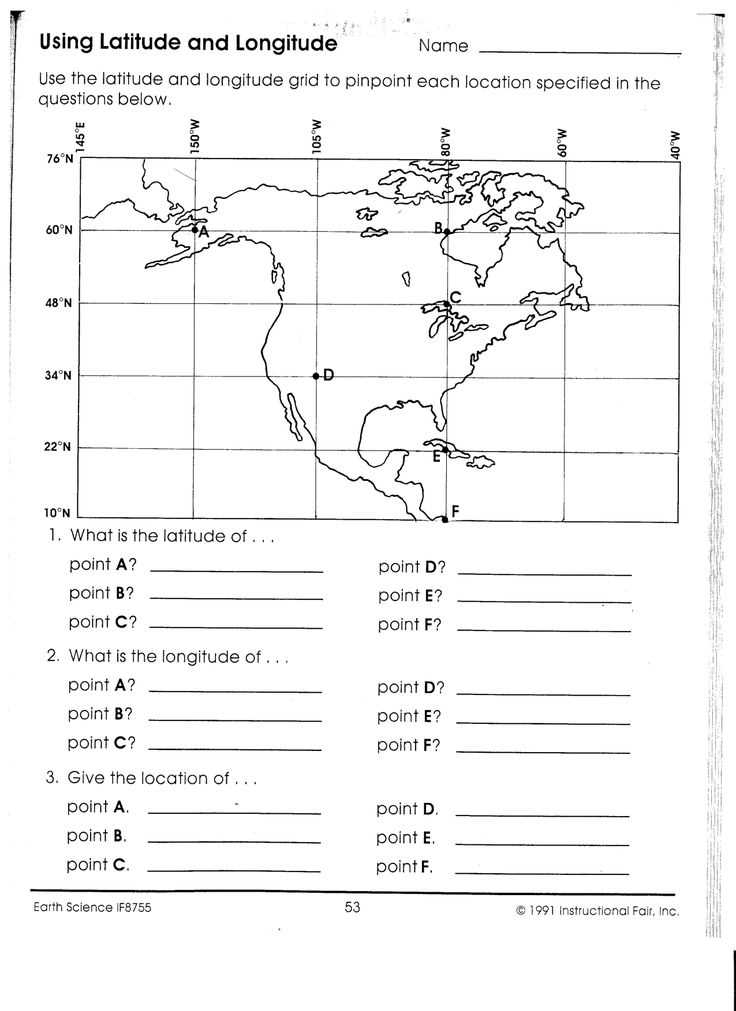
To accurately identify a location based on coordinates, first ensure you understand how the system works. Coordinates are represented as a pair of values: one for the vertical (north-south) position and one for the horizontal (east-west) position. By plotting these values on a map or using digital tools, you can pinpoint the exact spot you’re looking for. In this article, we provide practical steps to interpret and use these geographic markers efficiently.
Begin by converting the coordinate values into a usable format. Whether you are dealing with degrees, minutes, and seconds (DMS) or decimal degrees (DD), understanding the format is key. Afterward, use online mapping tools, such as Google Maps or specialized software, to enter these values and view the corresponding location. Cross-checking coordinates with physical landmarks or satellite imagery can further confirm accuracy.
For those seeking to verify their findings, tools like GPS systems and mapping apps provide real-time results, ensuring you can track locations with ease. In this guide, we will also cover common pitfalls in coordinate interpretation, such as mixing up the direction indicators (N/S, E/W) or confusing positive and negative values. Mastering these techniques can significantly improve your accuracy when working with geographic data.
Locating Coordinates with Precision
To correctly identify a spot on the Earth’s surface based on coordinate values, first ensure you have the exact numbers for the vertical and horizontal references. Each point is described by two numbers: the first represents the distance from the equator (north or south), and the second measures the distance from the prime meridian (east or west). These values are often expressed in either decimal or degrees, minutes, and seconds format.
Once the coordinates are confirmed, follow these steps to locate the point:
- Input the Coordinates: Use a mapping tool such as Google Maps or Bing Maps. Simply type the values in the search bar, ensuring that you include the correct signs (positive for north and east, negative for south and west).
- Double-Check the Formatting: Ensure that the coordinate system is consistent with the tool you are using. For example, Google Maps requires decimal degrees (DD) rather than degrees, minutes, and seconds (DMS).
- Check the Location: Upon entering the values, the map will display the exact location. Verify the location by reviewing nearby features or landmarks that are displayed on the map.
Additionally, satellite view or street view modes can be used to confirm the accuracy of the location once it’s plotted on the map. This ensures that the entered coordinates correspond to the actual physical location.
Remember that small errors in either the vertical or horizontal values can lead to significant discrepancies, so it’s important to enter the numbers carefully. If you’re working with a printed map, a ruler and scale can help you trace coordinates more precisely. For frequent coordinate-based tasks, consider using specialized tools or GPS-enabled devices to streamline the process.
How to Convert Coordinates into a Usable Location
To convert numerical values of position into a usable location, input the given coordinates into a reliable map application or software. Tools like Google Maps, Bing Maps, or mapping software on mobile devices make this process easy.
Follow these steps:
- Prepare the Coordinates: Ensure the values are in the correct format (decimal or degrees, minutes, and seconds). For decimal, check that the latitude is between -90 and 90, and the longitude is between -180 and 180.
- Enter the Coordinates: Open a mapping service, then paste or type the latitude and longitude values into the search bar. Be sure to include the correct signs: positive for northern or eastern values, negative for southern or western values.
- View the Location: After entering the coordinates, press enter or click the search icon. The exact spot will appear on the map. Use the zoom and street view features to explore the area further.
If the coordinates are correct, they should point to a specific location on the globe. Be aware of any errors in the numbers, as even small mistakes can lead to large discrepancies in location.
If you don’t have access to a mapping app, you can also use GPS devices or online geocoding tools to convert coordinates into an address or nearby location.
Common Mistakes to Avoid When Using Coordinates
Ensure that the format of the numbers is correct. Mixing up decimal and degrees/minutes/seconds formats can result in misplacement. Double-check that the decimal points are correctly placed.
Avoid reversing the values of the north-south and east-west axes. For example, swapping the signs of the coordinates can lead to entirely different locations. Always remember that positive values represent the northern and eastern hemispheres, while negative values point to the southern and western hemispheres.
Don’t forget to verify the accuracy of the coordinates before entering them into a map or GPS tool. Small errors in numbers can cause significant shifts in location. If you’re typing manually, confirm each digit to ensure no mistakes.
Watch out for outdated maps or tools that may not be accurate. Technology improves constantly, and using a modern platform will help ensure that the location is identified correctly.
Lastly, keep in mind that some locations might be marked incorrectly on older maps, so cross-reference the coordinates using multiple sources to confirm accuracy.
Understanding the Difference Between Latitude and Longitude
The north-south position of a location is indicated by its angular distance from the equator, measured in degrees. This value is referred to as the first coordinate, commonly represented by positive and negative values depending on whether the location is north or south.
The second coordinate, representing the east-west position, is determined by measuring the angular distance from the prime meridian, which runs through Greenwich, UK. Positive values represent locations to the east, and negative values indicate locations to the west.
These two coordinates are crucial for pinpointing exact positions on the Earth’s surface. The intersection of the two provides a precise point for any given location, which can be used to determine geographic data or plot a location on a map.
Unlike the first coordinate, which spans from 0° to 90° in either direction, the second coordinate spans from 0° to 180°. It’s important to correctly distinguish these when entering coordinates into mapping systems or GPS devices, as a small mix-up can lead to significant errors in location identification.
Step-by-Step Guide to Plotting Coordinates on a Map
1. Open a digital map or mapping tool such as Google Maps or Mapbox.
2. Locate the search bar and input the first coordinate, which represents the north-south value. Use either the positive or negative sign depending on the hemisphere. The second coordinate represents the east-west value, which should also be entered as a positive or negative value.
3. After entering both numbers, press the “search” or “enter” button to plot the location on the map.
4. If you’re working with a paper map, use the scale to find the corresponding points. The first number (north-south) tells you how far to measure up or down from the equator, and the second (east-west) tells you how far to measure left or right from the prime meridian.
5. Mark the spot on the map where the two coordinates meet. This will be your target location.
6. For more accuracy, use a grid on the map or a GPS device to verify the plotted spot’s precision.
Using Online Tools to Find Locations by Coordinates
1. Visit a reliable map service such as Google Maps, Bing Maps, or OpenStreetMap.
2. In the search bar, enter the pair of values representing the north-south and east-west points, separated by a comma.
3. Ensure you input the correct format: the first value corresponds to the vertical position (north-south), and the second value indicates the horizontal position (east-west).
4. After entering the values, press the “Search” or “Enter” button to automatically plot the position on the map.
5. Use the zoom feature to get a more detailed view of the location and surrounding area for better accuracy.
6. Explore additional features like street view, satellite imagery, or terrain mode to understand the environment around the location.
7. For advanced tools, websites like GPS Coordinates or What3words provide more detailed options to convert or share coordinates easily.
How to Verify Your Location Accuracy with Latitude and Longitude
1. Cross-check coordinates with a trusted map tool such as Google Maps or Bing Maps. Input the values directly into the search bar to confirm the plotted position matches the expected location.
2. Use multiple services to compare results. Different map platforms may offer varying levels of detail and accuracy, ensuring your location is correct.
3. Check the zoom level on your map. Sometimes, the plotted position may seem correct on a high-level map but reveal inaccuracies when zoomed in.
4. If available, enable the street view feature. This provides a visual representation of the location, confirming whether the coordinates match real-world landmarks.
5. For further verification, use GPS tools or apps on your mobile device that can provide your current geographic coordinates in real-time.
6. In case of discrepancies, double-check the format of the coordinates. Ensure that the decimal points or degree values are accurate and that the north-south and east-west indicators are correct.
7. If you are referencing a physical location, confirm it by checking nearby landmarks, roads, or building names within the plotted area.
Using Coordinates for Navigation: Tips and Techniques
1. Input coordinates accurately into navigation apps like Google Maps or Apple Maps. Double-check that the format (decimal degrees or degrees, minutes, seconds) matches the app’s requirements.
2. Use your mobile device’s GPS to track real-time position and adjust as necessary. This ensures you are on the right path based on your current location.
3. For manual navigation, plot coordinates on a paper map or offline map tool. Ensure the grid lines correspond to the correct scale and position.
4. Take note of the surrounding area. Identify prominent landmarks, roads, or natural features that align with the coordinates for easier navigation and to verify your route.
5. Always cross-check coordinates with multiple sources if possible. If you’re unsure about a location, use different mapping tools for verification.
6. For long-distance navigation, break the journey into smaller segments. Plot coordinates for each segment to ensure precise route planning and avoid getting lost.
7. When navigating in remote areas, download offline maps in advance. Ensure you have coordinates for safe points along the way in case of network failure.
8. Pay attention to time zone differences when using coordinates for navigation. The time it takes to travel between two locations may vary depending on geographical location and local time.
Advanced Methods for Finding Locations Using Geographic Coordinates
1. Leverage geospatial software such as QGIS or ArcGIS to input coordinates and retrieve detailed location data. These platforms allow users to visualize coordinates on interactive maps with advanced layers.
2. Use reverse geocoding services like OpenCage or Geocodio to convert geographic coordinates into specific addresses or locations. These tools provide more accurate results than standard maps.
3. Integrate with global positioning systems (GPS) that provide continuous updates for real-time navigation. Advanced systems combine satellite data with ground-based tracking for improved accuracy.
4. Utilize GPS-enabled drones for aerial location scouting. These devices can pinpoint coordinates from high altitudes, offering valuable perspectives for difficult-to-reach sites.
5. Access coordinate data through online databases such as GeoNames or USGS. These platforms store vast amounts of geographic data, including historical landmarks and environmental details.
6. Take advantage of smartphone apps designed for location analysis. Tools like Locus Map or Mapster allow users to visualize coordinates in 3D, track motion, and perform advanced measurements.
7. Apply spatial data science techniques for large-scale data sets. By analyzing coordinate-based information using machine learning models, users can predict locations or assess patterns within the data.
8. Explore crowdsourced location data from platforms like Wikimapia. This allows users to identify points of interest shared by the community and verify coordinates with local knowledge.
For more advanced geospatial techniques, refer to resources from trusted sources like Esri.