Geometry Rotations Worksheet Solutions and Explanations
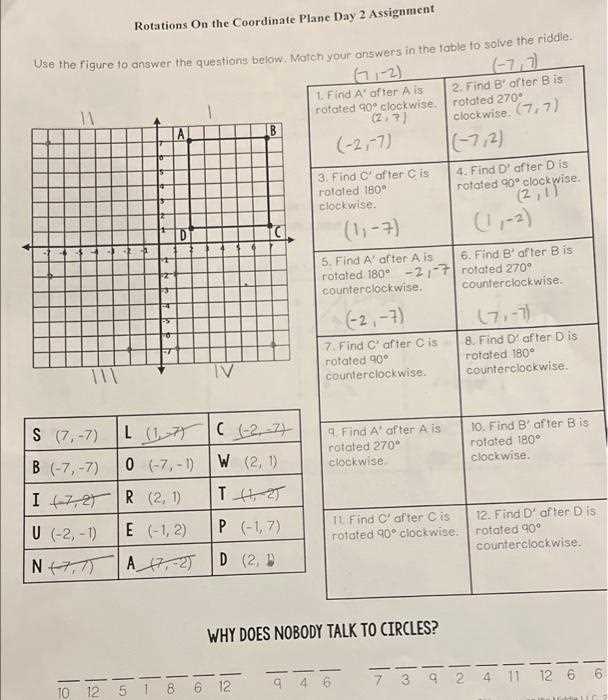
To properly handle rotation problems, start by applying the appropriate formulas for rotating points on the coordinate plane. For instance, to rotate a point 90 degrees counterclockwise, the coordinates of the point (x, y) change to (-y, x). Understanding these basic principles will simplify the process significantly.
Next, practice applying these formulas to various geometric shapes. Begin with simpler objects, like triangles or squares, and gradually progress to more complex shapes, such as polygons with more sides. This progression helps build a solid foundation for recognizing how transformations affect the entire figure.
When solving exercises, always double-check your results. Use symmetry and logical reasoning to verify whether the rotated shape fits within the expected area or alignment. It’s easy to make simple mistakes, such as reversing coordinate signs or miscalculating angles, but being methodical can help avoid these errors.
By using these strategies, you’ll develop a deeper understanding of how geometric transformations work and be able to tackle more difficult problems with confidence.
Geometry Transformations Solution Guide
To rotate a point 90 degrees counterclockwise around the origin, switch the x and y coordinates and change the sign of the new x coordinate. For example, rotating (2, 3) results in (-3, 2).
For a 180-degree counterclockwise rotation, simply negate both coordinates. A point like (4, -1) would become (-4, 1).
A 270-degree counterclockwise rotation involves swapping the x and y coordinates and negating the new y coordinate. Thus, the point (1, -4) would rotate to (4, 1).
After applying these basic formulas, check your results by sketching the shapes on graph paper or using digital tools to visualize the changes in position. This method ensures accurate results and a better understanding of geometric transformations.
Understanding Basic Rotation Concepts in Mathematics
Rotation is a transformation that turns a figure around a fixed point called the center of rotation. The amount of turn is measured in degrees, with common rotations being 90, 180, and 270 degrees. A 360-degree rotation brings the figure back to its original position.
For a 90-degree rotation counterclockwise, the coordinates of a point (x, y) become (-y, x). For a 180-degree counterclockwise rotation, the coordinates are negated, turning (x, y) into (-x, -y). A 270-degree rotation is similar to a 90-degree but in the opposite direction, transforming (x, y) into (y, -x).
These transformations preserve the shape and size of the figure, making rotation an isometry. Visualizing these changes on a coordinate plane helps in understanding how the point or shape moves with each rotation.
For further reference on rotation and transformations, check this Khan Academy Geometry Section.
How to Rotate Points and Figures on the Coordinate Plane
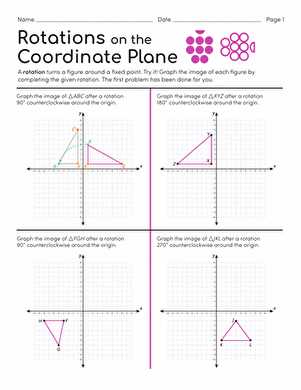
To rotate a point or figure on the coordinate plane, you need to apply specific rules for each angle of rotation. These transformations involve turning the points around a fixed center, typically the origin (0, 0), but they can also be around other points.
For a 90-degree counterclockwise rotation around the origin, the new coordinates of any point (x, y) become (-y, x). For a 180-degree counterclockwise rotation, the coordinates change to (-x, -y), which is essentially a point reflection through the origin.
For a 270-degree counterclockwise rotation, the transformation is (x, y) -> (y, -x), and for a full 360-degree rotation, the coordinates remain unchanged, as (x, y) becomes (x, y).
To rotate figures (such as triangles or squares), apply the same transformations to each vertex of the figure. Afterward, connect the transformed points to see the rotated figure.
To rotate around a point other than the origin, you must first translate the figure so the center of rotation aligns with the origin, apply the rotation, and then translate the figure back to its original position.
Step-by-Step Guide to Solving Rotation Problems
Follow these steps to solve any rotation problem with confidence:
- Identify the center of rotation: Determine whether the rotation is around the origin (0, 0) or another point.
- Choose the angle of rotation: Know whether you are rotating 90°, 180°, 270°, or 360° counterclockwise or clockwise.
- Apply the appropriate transformation rules:
- For a 90° counterclockwise rotation: (x, y) → (-y, x)
- For a 180° rotation: (x, y) → (-x, -y)
- For a 270° counterclockwise rotation: (x, y) → (y, -x)
- For a 360° rotation: (x, y) → (x, y)
- Apply the transformation to each point: If the problem involves a figure, apply the transformation to every vertex and calculate the new coordinates.
- Check the result: After performing the rotation, check the new positions of all points or the figure to ensure accuracy. If rotating around a point other than the origin, use a translation method to move the center of rotation to the origin first, apply the rotation, then move it back.
By following these steps and practicing with different angles and centers of rotation, you will gain proficiency in solving rotation problems effectively.
Using Rotation Rules for 90, 180, and 270 Degrees
To apply rotation transformations at various angles, follow these specific rules:
- 90° counterclockwise: For a 90° counterclockwise turn, the coordinates of a point (x, y) transform as follows:
- (x, y) → (-y, x)
- 180° rotation: A 180° rotation changes the sign of both coordinates:
- (x, y) → (-x, -y)
- 270° counterclockwise: A 270° rotation can be considered as a 90° clockwise turn. The coordinates (x, y) transform like this:
- (x, y) → (y, -x)
Apply these rules to each vertex of a figure or point to get the new coordinates after a rotation. If the rotation is around a point other than the origin, first translate the figure so the point of rotation is at the origin, perform the transformation, then translate back.
How to Apply Rotation Formulas for Different Quadrants
To apply rotation formulas in various quadrants, adjust the coordinates based on the quadrant’s position relative to the origin:
- First Quadrant (x > 0, y > 0): No change in signs. Use standard rotation formulas for 90°, 180°, and 270° transformations:
- 90° counterclockwise: (x, y) → (-y, x)
- 180°: (x, y) → (-x, -y)
- 270° counterclockwise: (x, y) → (y, -x)
- Second Quadrant (x 0): Here, x-values are negative and y-values are positive. Apply the same rotation rules, but be mindful of how the signs affect the coordinates after rotation:
- 90° counterclockwise: (x, y) → (-y, x)
- 180°: (x, y) → (-x, -y)
- 270° counterclockwise: (x, y) → (y, -x)
- Third Quadrant (x Both x and y are negative, so after rotation, the signs of both coordinates will change accordingly:
- 90° counterclockwise: (x, y) → (-y, x)
- 180°: (x, y) → (-x, -y)
- 270° counterclockwise: (x, y) → (y, -x)
- Fourth Quadrant (x > 0, y x is positive and y is negative. Similar to the other quadrants, rotate the coordinates and adjust for the negative y-values:
- 90° counterclockwise: (x, y) → (-y, x)
- 180°: (x, y) → (-x, -y)
- 270° counterclockwise: (x, y) → (y, -x)
For rotations around a point other than the origin, first translate the figure to make the center of rotation the origin, apply the rotation, then translate it back to its original position.
Common Mistakes in Geometry Rotations and How to Avoid Them
One frequent mistake is misapplying the rotation formula. Ensure that the correct signs are used for each quadrant. For a 90° counterclockwise turn, the transformation should be (x, y) → (-y, x). For 180°, the transformation is (x, y) → (-x, -y), and for 270°, it is (x, y) → (y, -x). Double-check the quadrant position to avoid sign errors.
Another common issue is forgetting to account for the direction of rotation. Many students confuse counterclockwise and clockwise turns, leading to incorrect results. Remember that a positive angle indicates a counterclockwise rotation, while a negative angle represents a clockwise rotation. Always verify which direction the figure is being rotated.
When rotating figures around a point other than the origin, it’s easy to forget to translate the points before and after the rotation. First, move the center of rotation to the origin, apply the rotation, and then move the figure back to its original position. Skipping this step can lead to inaccurate results.
A typical mistake is confusing the angles. A 90° rotation is not the same as a 270° rotation. Ensure you’re applying the correct angle formula based on the problem. Confusing these rotations often results in the wrong orientation of the figure after transformation.
Lastly, misinterpreting the transformation process can lead to errors. Visualize each rotation step-by-step, especially with complex figures, and avoid rushing through the calculations. Consistency and careful checking at each stage help prevent miscalculations and ensure accurate results.
Practical Tips for Verifying Your Rotation Results
One effective method to verify your results is to check the coordinates after the transformation. For example, if you’re rotating a point by 90° counterclockwise, use the formula (x, y) → (-y, x). Compare the calculated coordinates with your expected result. If they match, your rotation is correct.
Use graph paper or graphing software to visually verify your result. Plot the original and rotated figure on the same grid. If the transformation has been applied correctly, the figure should be the same shape and size, just in a different orientation. Ensure the rotation direction follows the correct angle–counterclockwise for positive angles and clockwise for negative ones.
Double-check the center of rotation. If the rotation is not around the origin, you must first translate the shape so that the center of rotation coincides with the origin. After completing the rotation, translate the shape back. Skipping this step can lead to inaccurate transformations.
For complex figures, break the shape into simpler components, like triangles or rectangles. Rotate each component separately and then reassemble the figure. This method allows you to verify smaller portions of the shape and can help you catch any mistakes in the overall transformation.
Another tip is to check the angles. For a 180° rotation, for instance, all points should end up exactly opposite to their original positions on the coordinate plane. This can serve as a quick check to see if the transformation is consistent with the rules.
Finally, reverse the rotation to verify your results. If you rotated a figure by 90° counterclockwise, rotate it back by 90° clockwise. The shape should return to its original position. If not, review your steps to find where the mistake occurred.
Further Resources for Mastering Geometry Rotations
Explore interactive tutorials on websites like Khan Academy (https://www.khanacademy.org), which provide step-by-step guides and video lessons on coordinate transformations, including the application of rotation formulas.
Use online graphing tools like Desmos (https://www.desmos.com/calculator) to visualize transformations in real-time. This can help you better understand the geometric effects of rotating points and figures on a coordinate plane.
For deeper theoretical knowledge, refer to “Euclidean and Non-Euclidean Geometries” by Marvin J. Greenberg. This book offers detailed explanations on transformation geometry, including advanced topics on rotation and symmetry.
For practice, websites like IXL (https://www.ixl.com) offer targeted exercises on coordinate transformations, including rotations. This platform provides immediate feedback to help you identify areas for improvement.
To further refine your skills, consider using problem sets available on sites like Brilliant.org (https://www.brilliant.org). These sets include challenging problems that apply rotational concepts in a variety of contexts.