Circumference Calculation Guide for Practice Worksheets and Step Checks

Use radius or diameter values as primary inputs, since each controls how a round form scales and how its surrounding measure is produced. Precise numeric selection removes guesswork and supports direct substitution into 2πr or πd relations.
Rely on a stable π value such as 3.14 or 22/7, applied consistently across all practice items. Mixed sets often shift between radius and diameter, so confirm which metric appears in each prompt before running any calculation.
Compare final outputs against a structured solution guide by checking unit alignment, decimal placement, and step order. This process highlights misread inputs or skipped multipliers, allowing quick adjustments without repeating full work.
Guided Outputs for Perimeter Tasks on Round Figures
Confirm whether a prompt supplies a radius or diameter, since this choice determines whether you apply 2πr or πd. Mixing them produces incorrect multipliers, so verify the given measure before substituting any value.
Apply a fixed π value–3.14 or 22/7–to maintain uniformity across all items. Shifting between approximations produces mismatched totals, especially when comparing your results to a structured solution guide for practice sets.
Check each computed perimeter by reviewing three points: input identification, sequence of operations, and final unit labeling. Misreads frequently stem from overlooking whether the figure’s size was provided as a full span or half span, so re-inspect each prompt before confirming totals.
Identifying Radius or Diameter Values from Worksheet Prompts
Verify whether a prompt presents a half-span or full-span measurement before applying any perimeter formula. Confusion between these two quantities produces doubled or halved results.
- Check labels such as r, d, “half-length,” or “full span.” A single letter often indicates a half-span, while verbal descriptions may specify a complete width.
- If both values appear, prioritize the one explicitly tied to the figure. Extra numbers may serve as distractors.
- Convert a full-span to a half-span by dividing by two whenever the formula you intend to use requires the smaller measure.
- When a diagram is included, measure markers show whether a segment reaches only to the midpoint or spans the entire shape.
- Reject ambiguous prompts; re-read numerical labels to confirm whether units are consistent across all listed values.
Accurate identification of the correct span ensures clean substitution into π-based calculations and prevents avoidable missteps during perimeter tasks.
Selecting Correct Perimeter Formula for Given Inputs
Apply 2πr once prompts supply radius data; apply πd once span data appears. Match each value precisely, since mixing radius and full-span inputs produces doubled or halved outputs.
Confirm units align across prompt data, then choose a relation:
Use 2πr for half-span inputs.
Use πd for full-span inputs.
Convert full-span to half-span by dividing by two whenever only radius-based form suits prompt data. Consistent substitution guards against miscalculated round-boundary length.
Applying π Approximations for Fractional and Decimal Tasks
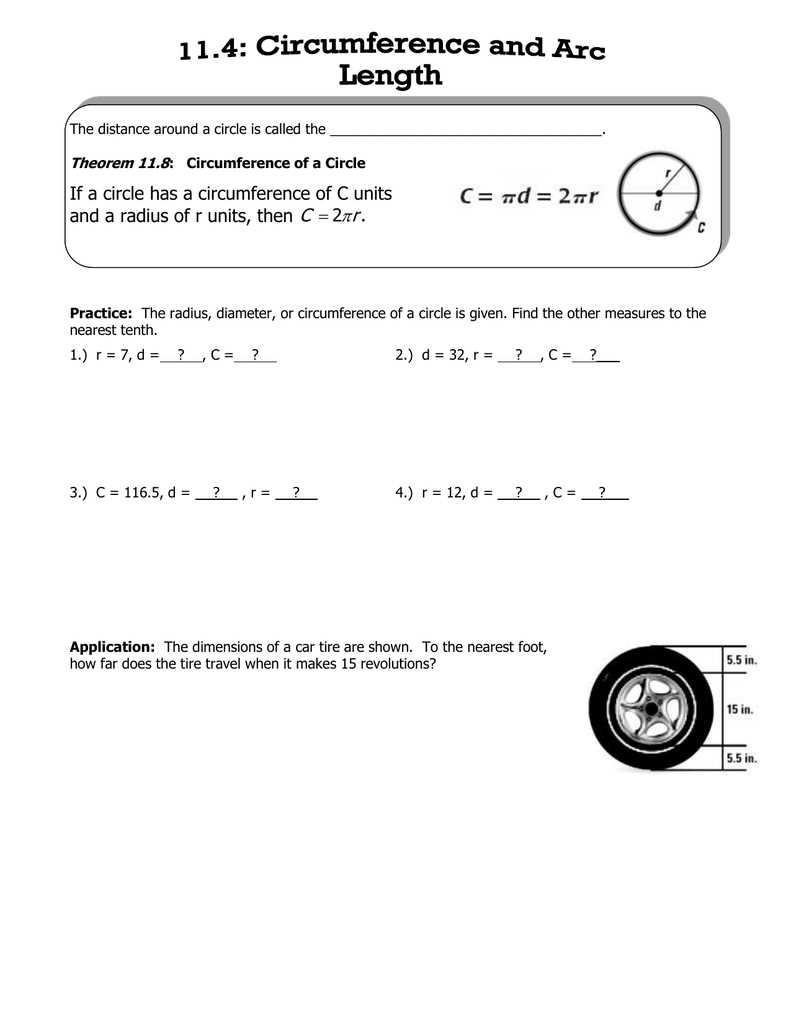
Use π ≈ 3.14 whenever a prompt requests rounded perimeter values requiring two-decimal precision; reserve π ≈ 22/7 for fraction-focused tasks where simplified rational output is preferred.
Keep these guidelines strict: choose 3.14 for metric-based inputs, avoid mixing 22/7 in decimal-heavy sets, and convert fractional span values to decimals before substitution if uniform rounding is required.
For higher precision, apply π ≈ 3.14159, especially when multi-step operations amplify rounding drift. A clear comparison of commonly accepted π values is available at https://www.nist.gov.
Solving Mixed Sets Featuring Both Radius and Diameter Variants
Convert all inputs to a single span type before substituting values; turn full-span data into half-span values by dividing by two, or convert half-span data into full-span values by doubling.
Maintain consistent π usage across each task to avoid mismatched rounding. If a prompt mixes fractional and decimal spans, translate them into one format before applying any perimeter relation.
When multi-step prompts include diagrams, extract span length directly from labeled points, verify whether given segments represent full-span or half-span, then apply the correct formula without mixing forms.
Checking Computed Results Against Common Student Mistakes
Verify each step by comparing input span type with output formula use; mislabelled radius or diameter often skews final values.
Flag sums that ignore π choice; shifts between 3.14, 22/7, or symbolic π produce mismatched totals.
Spot cases where learners apply 2r or d inconsistently; check units, rounding rules, and placement of π to keep outputs aligned with task data.
Reworking Incorrect Attempts Using Step-Based Verification
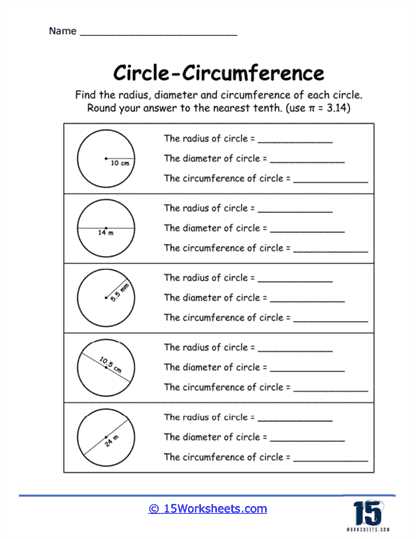
Rebuild each solution through a fixed sequence: confirm whether radius or diameter was supplied, then match it to the correct expression using 2r or d as groundwork before inserting π.
Inspect arithmetic in isolation; recalc multiplications such as 2 × r or π × d to locate slips caused by digit transposition or rounding jumps.
Compare intermediate values with expected magnitude; unusually small or large results often signal swapped inputs, omitted π, or inconsistent unit choices.
Matching Numeric Patterns to Worksheet Solution Formats
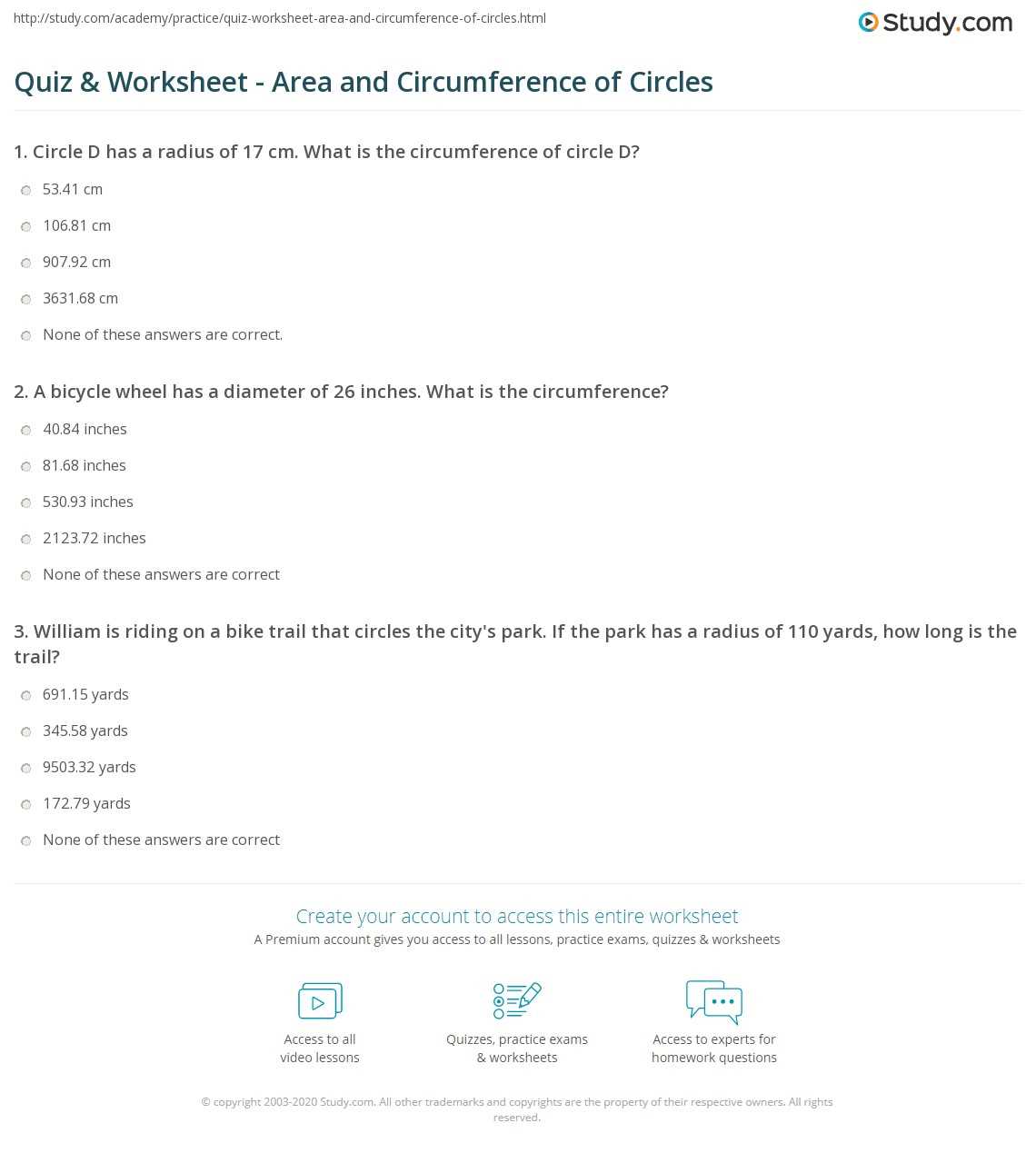
Align each computed value with a target structure by checking whether the pattern reflects a π-based form or a fully evaluated decimal; inconsistencies appear quickly when π is missing or expanded incorrectly.
Use fixed numeric cues: expressions built from 2r typically produce pairs of repeated factors, while expressions built from d generate single-step multiplications. Compare these traits with the expected template.
| Input Type | Pattern Indicator | Recommended Output Form |
|---|---|---|
| Radius | Value doubled before applying π | 2rπ or its decimal equivalent |
| Diameter | Direct multiplication with π | dπ or its decimal equivalent |
| Mixed Sets | Mismatch between doubling and direct use | Adjust by rechecking whether input represents r or d |
Verify final outputs by confirming that the magnitude aligns with the expected scale; values generated from d should trend larger than those built from the same numeric r, correcting misapplied patterns.
Using Completed Solutions to Build Speed and Accuracy in Practice
Reuse finalized examples by extracting repeatable patterns that shorten computation time and reduce missteps.
- Record whether each model solution relies on 2rπ or dπ; apply the same structure instantly to new inputs.
- Create a small set of timed drills using prior samples; limit each run to 20–30 seconds to reinforce rapid factor checks.
- Note typical decimal outputs produced by π ≈ 3.14 versus π ≈ 22/7; memorizing these ranges helps detect off-scale results.
- Compare numeric growth from radius-based data and diameter-based data to anticipate expected magnitude before calculating.
- Sort completed items into two groups–symbolic π and evaluated decimals–to streamline recognition of required formats.
- Apply backward inspection: verify whether doubling or direct multiplication was used, then match that process in fresh tasks.
Consistent practice with curated samples builds pattern awareness, enabling faster recognition of correct forms and quicker confirmation of final values.